Kindly GPT with External Data
If you wish to insert custom data into Kindly GPT that is not reachable by default URL scraping (for example intranet pages, authenticated pages, or data in formats you must transform yourself), you can use the External Scraping Integration API. See Connect -> Kindly GPT - External Integration.
Note: If you wish to scrape a normal URL, we recommend using our out-of-the-box URL scraper in Kindly instead. See Connect -> Kindly GPT - Scrape web content.
Overview
The end-to-end flow is:
- You set up a web server (your External Scraper).
- Kindly sends a pull trigger request to your External Scraper.
- Your External Scraper prepares data and uploads it to Kindly when ready.
sequenceDiagram
    participant KindlyServer as Kindly Server
    participant ExternalScraper as External Scraper (Webserver)
    participant DataIngress as Data Ingress Endpoint

    Note over ExternalScraper: Setup the External Scraper webserver
    KindlyServer->>ExternalScraper: Daily call (trigger)
    ExternalScraper->>KindlyServer: Send OK Response
    ExternalScraper->>ExternalScraper: Prepare data
    ExternalScraper->>DataIngress: Send data when ready
Registering the External Scraper
In your Workspace dashboard, go to Connect -> Kindly GPT - External Integration - Read more.
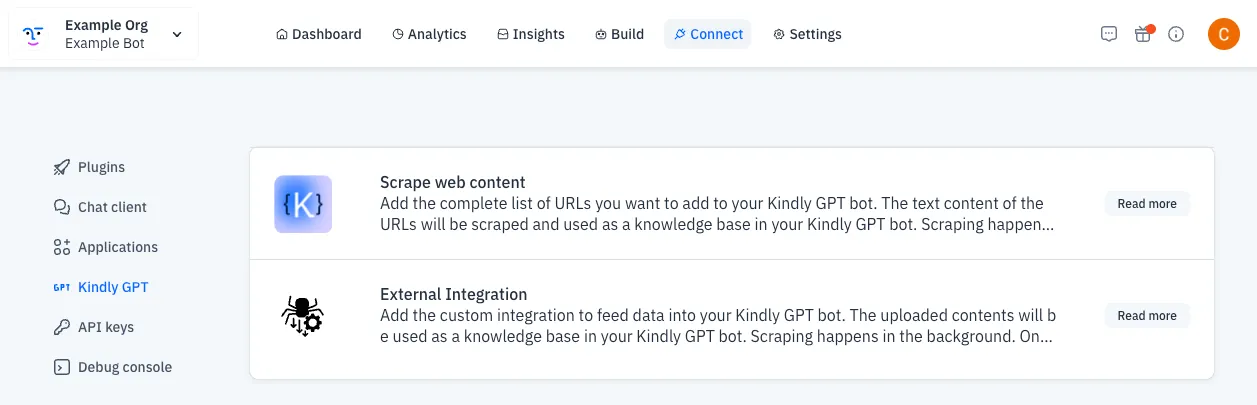
From there you can add your External Scraper URL.
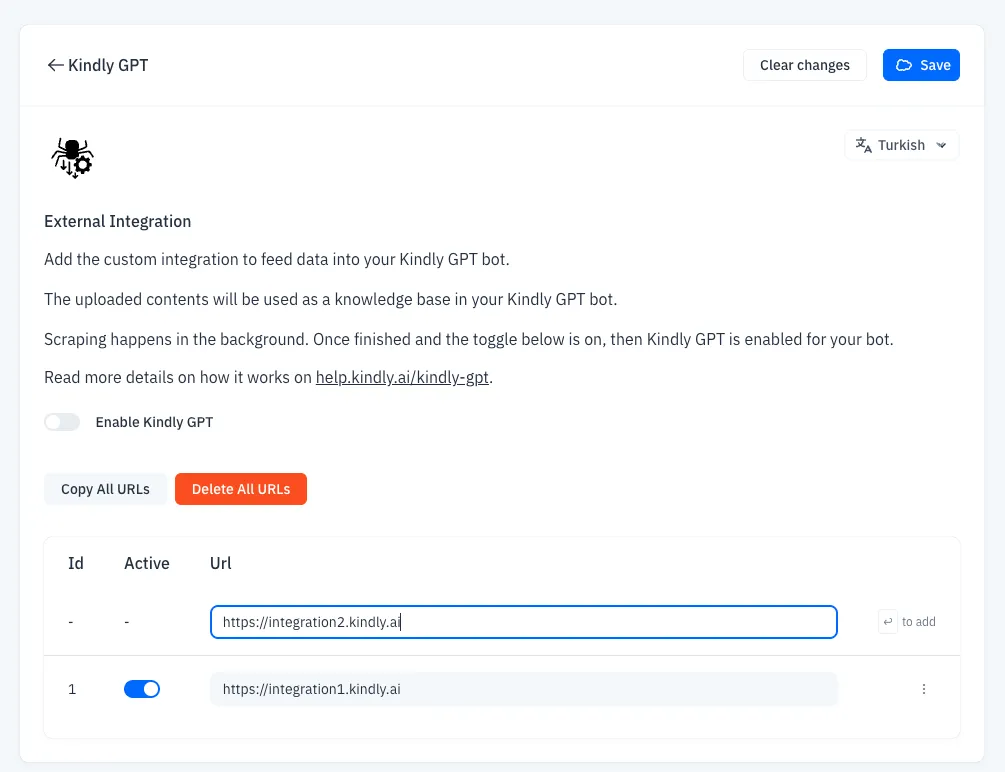
Kindly will send a trigger event to your server daily. The details of how to create your server is explained in incoming sections.
Each bot market and language has separate External Scraper integration setups. All the markets and languages can point to the exact same URL but each Pull Trigger only does 1 market/language combination at a time. If you have multiple bots, they can use exact same URL as well. We send some bot identifiers with the Pull Trigger.
Pull Trigger: What Kindly Sends to Your Server
Kindly sends a signed POST request to your external scraper URL.
curl
    -X POST
    -H "Kindly-HMAC: {{HMAC_OF_THE_BODY}}"
    -H "Kindly-HMAC-algorithm: HMAC-SHA-256 (base64 encoded)"
    -H "Kindly-Bot-Id: {{YOUR_BOT_ID}}"
    -H "Kindly-Config-Id: {{EXTERNAL_SCRAPING_URL_ID}}"
    {{URL_TO_YOUR_SCRAPER}}
    -d  @<(cat <<EOF
{
  "bot_id": "{{YOUR_BOT_ID}}",
  "config_id": "{{EXTERNAL_SCRAPING_URL_ID}}"
}
EOF
)
The upload json form field must include all fields received in the Pull Trigger JSON body, preserving their values. You may add the optional filename_to_url field. Do not remove, rename, or modify fields received in the Pull Trigger.
You need to implement HMAC validation on your end.
HMAC & Kindly Implementation of HMAC
If you never worked with HMAC, we suggest you seek some external documentation on it.
We suggest the following:
Validate all signed requests using HMAC-SHA256 over the exact raw body bytes.
In Kindly we use HMAC-SHA-256 (base64 encoded).
Rules:
- Do not normalize or reformat the body before verification
- Use your workspace's webhook signing key.
- Base64-encode the resulting digest.
- Compare to Kindly-HMAC.
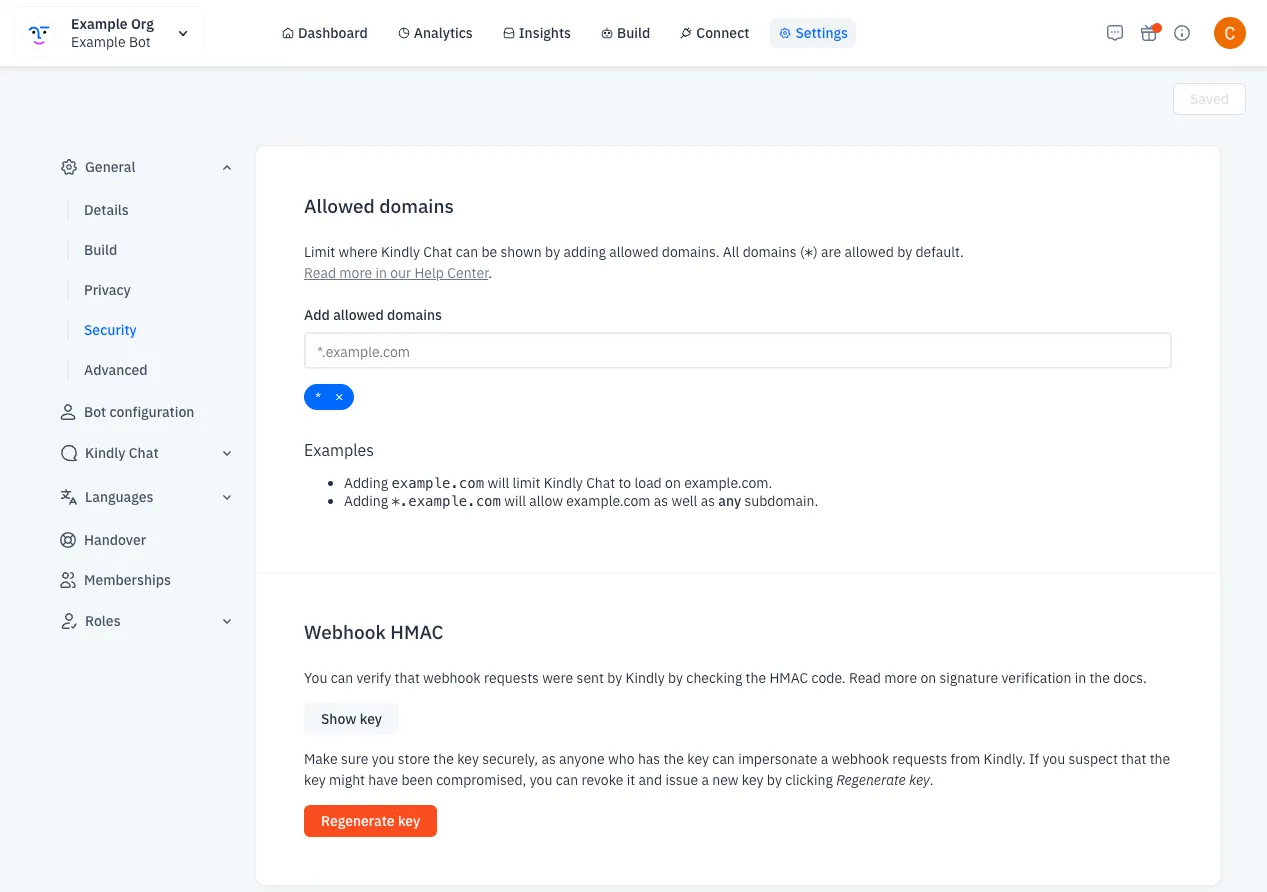
To find your Bot's HMAC key you need to go to Workspace Dashboard, then Settings -> General -> Security -> Show key.
Responding To Pull Trigger
When you receive the Pull Trigger, you should respond with a generic HTTP Status 200 Response.
Do not include scraped content in the response to the pull trigger.
Preparing Data For Upload
Create a ZIP with content files.
- It should have a collection of files in the root level
- Files can only be raw Markdown (.md), raw text (.txt), or HTML. Every other file types will be rejected.
Files and source URLs
All files can be uploaded together in one ZIP under the same config_id. You do not need one External Integration configuration per source page.
A ZIP archive can contain multiple content files. Kindly treats each file as one source-link unit.
Configuration refresh behavior
A config_id identifies one External Integration configuration for a bot, language, and market selection. Each upload is treated as the complete current content set for that configuration. A later upload replaces content previously uploaded under the same config_id.
Upload Contract
Send a multipart/form-data POST request to datastore.kindly.ai.
Form parts:
- file: ZIP archive
- json: JSON payload
Max request size is 5 MB (5,242,880 bytes).
Upload JSON Body
The upload json form field must include all fields received in the Pull Trigger JSON body, preserving their values. Do not remove, rename, or modify those fields. You may add the optional filename_to_url field described below.
{... BODY YOU RECEIVED FROM PULL TRIGGER ...}Upload JSON Body (with sources)
Optionally, you can add a custom field to the body filename_to_url, which allows Kindly GPT to show source links. This is a mapping from filename to URLs so our AI Agent can show the references whenever Kindly GPT is used. If you don't provide this mapping, it will still use Kindly GPT but won't show the references.
Filenames must be unique within the ZIP, because filename_to_url uses the filename as its mapping key.
filename_to_url maps each filename to one source URL. A single file cannot have multiple source URLs.
To show distinct source links for separate pages, you need to upload each page as a separate, uniquely named file.
Here is an example body with references:
{
  "bot_id": "{{YOUR_BOT_ID}}",
  "config_id": "{{EXTERNAL_SCRAPING_URL_ID}}",
  "filename_to_url": {
      "file1.html": "https://mysite1.com",
      "file2.html": "https://mysite2.com",
      ...
  }
}
Upload Headers
- Kindly-HMAC: HMAC over the full raw multipart request body.
- Kindly-Bot-Id: Bot ID (recommended and still supported).
- Content-Length: is required and must be a valid numeric value. Kindly accepts uploads up to 5 MB (5,242,880 bytes). Set this header to the exact request body size you send.
Example scraper
See an example of an external integration written in Python:
Troubleshoot
403 HMAC does not match
Common causes:
- The request body changed after it was signed.
- Wrong bot signing key.
403 config_id does not belong to this bot
Your upload `bot_id` and `config_id` do not match Kindly's stored configuration.
400 Unsupported file types detected
Your ZIP contains file extensions outside .md, .txt, .html.
411 Content-Length header is required and must be valid
Include a valid numeric Content-Length header.
Advanced
Push mode
Push mode is supported. You can upload without waiting for a pull trigger, but you must still provide valid identity pairing.